You save a high quality image from a website. Your computer refuses to open it. The file ends in .avif, and you have no idea what to do with it.
Or you’re a developer staring at a failing Google PageSpeed Insights report you can’t fix, and every audit tells you to “serve images in next-gen formats.”
If either of those scenarios sounds familiar, you are in the right place. AVIF is what both of those situations are pointing you toward. Here is everything you need to know about AVIF, how it works, and how to use it.
TL;DR
- AVIF (AV1 Image File Format) is a next-gen image format developed by the Alliance for Open Media.
- Up to 50% smaller file sizes than JPEG, and 30% smaller than WebP, at comparable or better visual quality.
- Supported by Chrome, Firefox, Safari, and Edge.
- Open AVIF files in any modern browser, or convert them to JPG/PNG using free tools available online.
What Is an AVIF File?
AVIF stands for AV1 Image File Format. To put it simply, it is an image format derived from the AV1 video codec. That’s the same codec behind 4K streaming on YouTube.
When streaming giants needed a way to transmit ultra-high-definition 4K video over the internet without constantly buffering, they created the AV1 video codec.
Web developers quickly realized that the technology used to compress those individual video frames could be extracted and used to compress static images on websites.
The result was AVIF. The format is maintained by the Alliance for Open Media (AOMedia), a consortium backed by major tech heavyweights including Google, Apple, Netflix, Cisco, and Mozilla.
These companies don’t typically collaborate on this level, so this coordination reflects how seriously the industry is treating the format.
Because it is open source and royalty free, its quickly becoming one of the most promising modern image formats for the web. AVIF uses the HEIF (High Efficiency Image File Format) container. It’s the same container Apple uses for iPhone photos.
The difference is that AVIF uses AV1 for compression rather than HEVC, which is what Apple’s HEIC format relies on.
How AVIF Works?
The reason AVIF drastically outperforms legacy formats comes down to the underlying math and architecture of the AV1 codec.
Lossy vs. Lossless Compression
AVIF handles both. Lossy mode drops image data your eyes won’t catch. Lossless mode keeps every pixel intact. JPEG only does lossy. PNG only does lossless.
AVIF does both, which makes it a practical replacement for either format depending on your use case. It’s lossy compression is particularly impressive, stripping away file weight without introducing the “blocky” artifacts commonly seen in highly compressed JPEGs.
Color Depth and HDR
Legacy formats like JPEG top out at 8-bit color. AVIF supports 10-bit and 12-bit color depth, giving you over a billion possible colors vs. JPEG’s 16.7 million.
It also has built-in support for High Dynamic Range (HDR) and Wide Color Gamut (WCG), so it can carry image data that JPEG can’t represent. AVIF captures blindingly bright highlights and deep shadows without banding or loss of detail. If you’re serving visuals on modern OLED or P3 displays, that gap matters.
Why is AVIF the Best Image Format for the Web?
If you are building a website today, using newer formats like AVIF can significantly reduce image size compared to JPEG or PNG. It provides a unique combination of features that no other single format currently matches:
- Lossy and Lossless Compression: Extensive tests by Netflix and AOMedia have shown that AVIF yields over 50% file size savings compared to standard JPEGs, and over 30% savings compared to WebP, all while looking visually identical.
- HDR and Wide Color Gamut support
- 10-bit and 12-bit color depth
- Transparency: It supports alpha channels (transparent backgrounds) just like a PNG, but at a fraction of the weight.
- Animation: It supports animated image sequences (like a GIF), but without the massive file bloat and 256-color limit of standard GIFs.
- No licensing fees
Netflix uses AVIF to deliver incredibly crisp and high quality movies and show posters at significantly reduced bandwidth. They’ve published technical write ups on this.
For a platform serving hundreds of millions of households, the savings are substantial. The same compression logic applies to your site, just at a smaller scale.
AVIF vs. WebP vs. JPEG vs. PNG
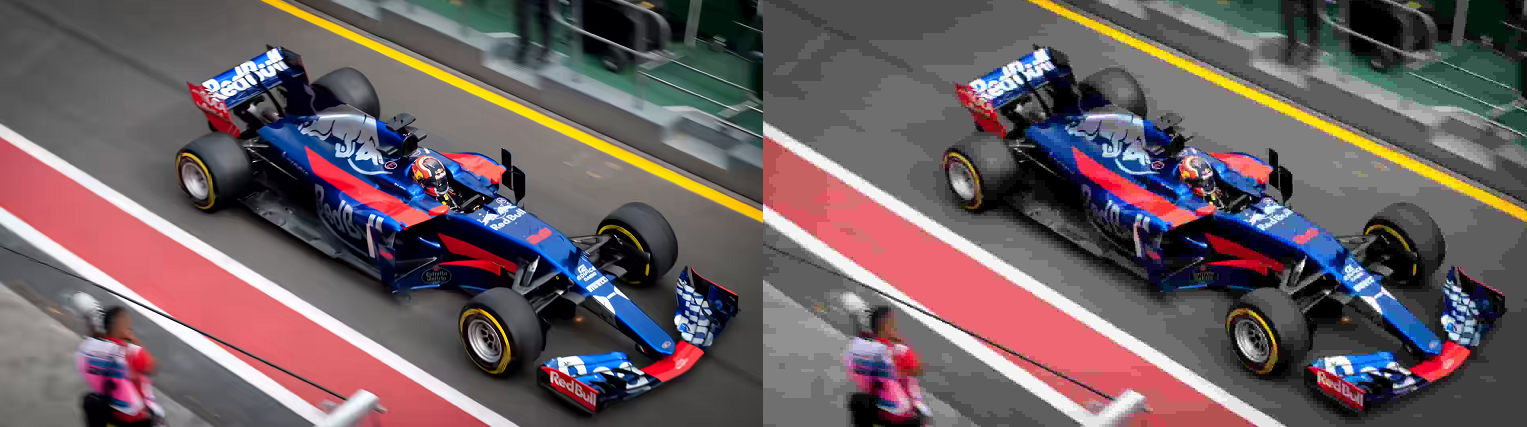
AV1 vs JPEG file
| Feature | JPEG | PNG | WebP | AVIF |
|---|---|---|---|---|
| Compression type | Lossy only | Lossless only | Lossy + Lossless | Lossy + Lossless |
| Typical file size | Baseline | ~2x larger than JPEG | ~25-30% smaller than JPEG | ~50% smaller than JPEG |
| Color depth | 8-bit | 8/16-bit | 8-bit | 10/12-bit |
| HDR support | No | No | No | Yes |
| Transparency | No | Yes | Yes | Yes |
| Animation | No | Yes (APNG) | Yes | Yes |
| Browser support | Universal | Universal | 97%+ | 93%+ |
| Encoding speed | Fast | Fast | Fast | Slower |
AVIF’s encoding speed is slower than WebP and JPEG. Worth knowing if you’re converting large batches in real time. For pre-built static assets, it’s a one-time cost that doesn’t affect your users.
When to Use AVIF?
While AVIF is a great general-purpose format, there are a few scenarios where adopting it will yield massive dividends.
Image Heavy Websites
Photography portfolios, news sites, and editorial publications deal with large image libraries. Halving image weight cuts bandwidth costs and speeds up load times across every page.
Pair it with lazy loading and the difference on mobile connections is measurable.
E-Commerce Product Images
Product photography drives purchase decisions. Online stores live and die by visual quality. Customers want to zoom in on product details, textures, and colors.
You need detail and accuracy. AVIF lets you serve high-fidelity images at file sizes that don’t slow down product pages. Slow product pages lose conversions. High-quality JPEG is often the culprit.
HDR and Professional Photography
If your images contain HDR data or were shot in a wide color space, JPEG can’t preserve that information. AVIF absolutely can. For photographers displaying work on high-end monitors, or brands with strict color accuracy requirements, that’s a practical distinction.
Does AVIF Improve SEO?
Yes, absolutely. Google has explicitly stated that page speed is a ranking factor, and images are usually the heaviest element on a webpage.
Page Speed as a Ranking Factor
Google has factored page speed into rankings since 2010 for desktop and 2018 for mobile. Smaller images load faster. Faster pages score better. This shows up directly in PageSpeed Insights audits when you switch from JPEG to AVIF.
Core Web Vitals
Google’s Core Web Vitals measure real-world user experience.
- Largest Contentful Paint (LCP) measures how long it takes for the biggest visible element on your page to load. For most pages, that’s a hero image. A 200KB JPEG hero converted to AVIF typically lands around 80-100KB with no visible quality drop. That’s a direct LCP improvement, and LCP is a confirmed Google ranking signal.
- Cumulative Layout Shift (CLS) can also improve indirectly. Faster-loading images reduce the chance of layout shifts during render, especially on slower connections.
- Interaction to Next Paint (INP) isn’t directly tied to image format, but pages with lower total payload tend to be more responsive overall.
Mobile First Indexing
Google indexes the mobile version of your site. Mobile users on cellular connections are more sensitive to page weight than desktop users on broadband. AVIF’s compression advantage scales proportionally on mobile.
Real World Numbers
Data from the HTTP Archive shows images account for roughly 50% of the average webpage’s total weight.
Cutting that with AVIF has a larger cumulative effect on Core Web Vitals than most other single optimizations you can make without restructuring your page architecture.
Use this checklist to optimize your site with AVIF:
- Run your URL through PageSpeed Insights
- Identify your largest image assets
- Convert one hero image with an free tool online and compare sizes
- Implement the
< picture >tag fallback - Re-run PageSpeed and compare your LCP score
How to Open an AVIF File?
The fastest way: drag the file into Chrome, Firefox, or Safari. All three render AVIF natively.
Windows: Windows 11’s Photos app supports AVIF. On Windows 10, install the AV1 Video Extension from the Microsoft Store (free).
Mac: macOS Ventura (13) and later support AVIF in Preview. On older macOS versions, open the file in your browser.
Browser and Platform Support
The adoption rate for AVIF has been remarkably high.
| Browser / Platform | AVIF Support | Since |
|---|---|---|
| Chrome (desktop + Android) | Full | v85 (2020) |
| Firefox | Full | v93 (2021) |
| Safari (macOS + iOS) | Full | v16.1 / iOS 16 (2022) |
| Edge | Full | v121 (2024) |
| Samsung Internet | Full | v14 |
| Internet Explorer | None | N/A |
IE is end-of-life with under 0.3% global usage share. For legacy browsers that do not support the format, developers easily use the HTML < picture > tag to serve a WebP or JPEG fallback.
Does WordPress Support AVIF?
WordPress 6.5 (released April 2024) added native support. You can upload .avif files to the Media Library and use them like any other image. WordPress also generates responsive image sizes in AVIF automatically, provided your server’s PHP environment has the right extensions enabled (specifically, libavif support in GD or Imagick).
If you’re on an older version, or your host hasn’t enabled those extensions, plugins like ShortPixel, Imagify, or EWWW Image Optimizer handle conversion and serve AVIF with WebP/JPEG fallbacks automatically.
They can also bulk-convert your existing media library, so you don’t have to re-upload anything.
The Final Veridict?
The internet is becoming faster, more visual, and more mobile-reliant. AVIF is no longer just a “future” format. It is the modern standard for web imagery.
If you haven’t audited your website’s images lately, now is the time to check your PageSpeed Insights and start making the switch.
Frequently Asked Questions
Is AVIF better than JPEG?
For web use, yes. It produces files roughly 50% smaller than JPEG at comparable quality. It also supports transparency, animation, HDR, and 10/12-bit color. JPEG doesn’t support any of those.
Is AVIF better than WebP?
In most compression benchmarks, AVIF produces smaller files. It also handles gradients and fine detail better. WebP encodes faster, which matters for real-time image processing. Browser support is slightly wider for WebP, though AVIF is at 93%+ and still climbing.
Is AVIF lossless?
Yes. AVIF supports both lossy and lossless modes. Lossless preserves every pixel. File sizes in lossless mode are larger than lossy, but generally smaller than lossless PNG.
What does AVIF stand for?
AVIF stands for AV1 Image File Format.
How do I open an AVIF file?
Drag it into Chrome, Firefox, or Safari. On Windows 11, the Photos app opens AVIF natively. On Windows 10, install the free AV1 Video Extension from the Microsoft Store. On macOS Ventura or later, Preview handles it. On older macOS versions, use a browser.
Why did my image save as an AVIF?
Sites serve AVIF to reduce file sizes and load times. When you right-click and save, your browser saves the image in its original format. If the site was serving images in the AVIF format, that’s what you’ll get.
Does Apple support AVIF?
Yes. Safari on macOS Ventura (13+) and iOS 16+ supports AVIF natively. Apple is an AOMedia member and was involved in the format’s development.